
Configuring a network switch might be something new for certain people. Here are my notes on configuring a new Ruijie Switch.
Accessing the Switch
Serial console (physical console port on the switch) — RJ45 console jack or micro-USB console on newer models. Most reliable for first access.
SSH / Telnet / Web GUI — once the switch has IP and remote management enabled.
If the switch has an RJ45 console port you need a console rollover cable (RJ45-to-DB9) or an RJ45-to-USB adapter.
If it has a micro-USB console, a regular micro-USB-to-USB cable will work (no serial adapter needed on many models).
You will need PuTTY to access the switch.
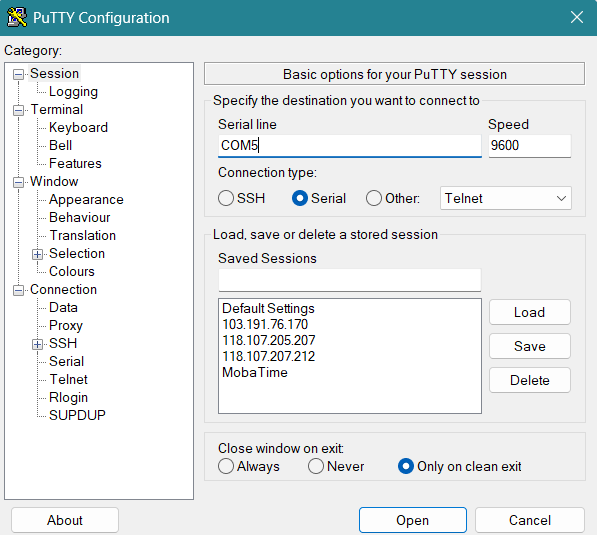
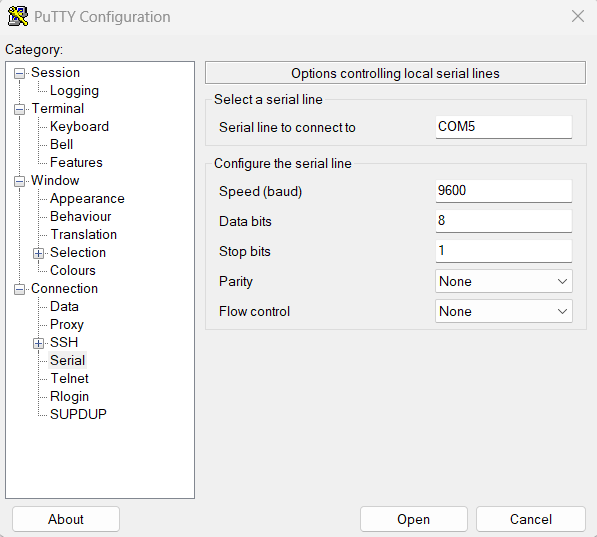
Each switch has different PuTTY Configuration. Make sure to refer to the user manual. To determine the Serial Line, go to Device Manager → find the COM port (e.g. COM3).
ENTER CONFIGURATION MODE
enable
configure terminal
SET HOSTNAME
hostname PIS.MS.01 (any name also can)CREATE VLAN
vlan 2
name VLAN2
exit
vlan 5
name VLAN5
exit
ASSIGN PORT TO VLAN
Let’s say for Ruijie Switch Port 1-8 you want to assign it to VLAN 5
interface range gigabitEthernet 1/0/1-8
switchport mode access
switchport access vlan 5
exit
ASSIGN IP ADDRESSES TO VLAN interfaces (SVIs)
interface vlan 5
ip address 100.5.84.1 255.255.255.0
exit
ENABLE VLAN INTERFACE
interface vlan 2
no shutdown
exit
SAVE CONFIGURATION
write
copy running-config startup-config
LINK SWITCH (my terms haha)
interface tenGigabitEthernet 0/26 (which ever port is fiber)
switchport trunk allowed vlan only 2,5
Leave a Reply